LPG AYAR KABLOSU YAPIMI (Uygun Fiyatlı)
Making an Affordable DIY LPG Diagnostic Cable
 İhsan Bal
Ayar kablonuz yalnızca LPG Ecunuza tam uyumlu olan program ile çalışacaktır. Farklı ayar programlarında çalışmayacaktır. LPG ayar programları için tıklayınız.
Malzemeler:
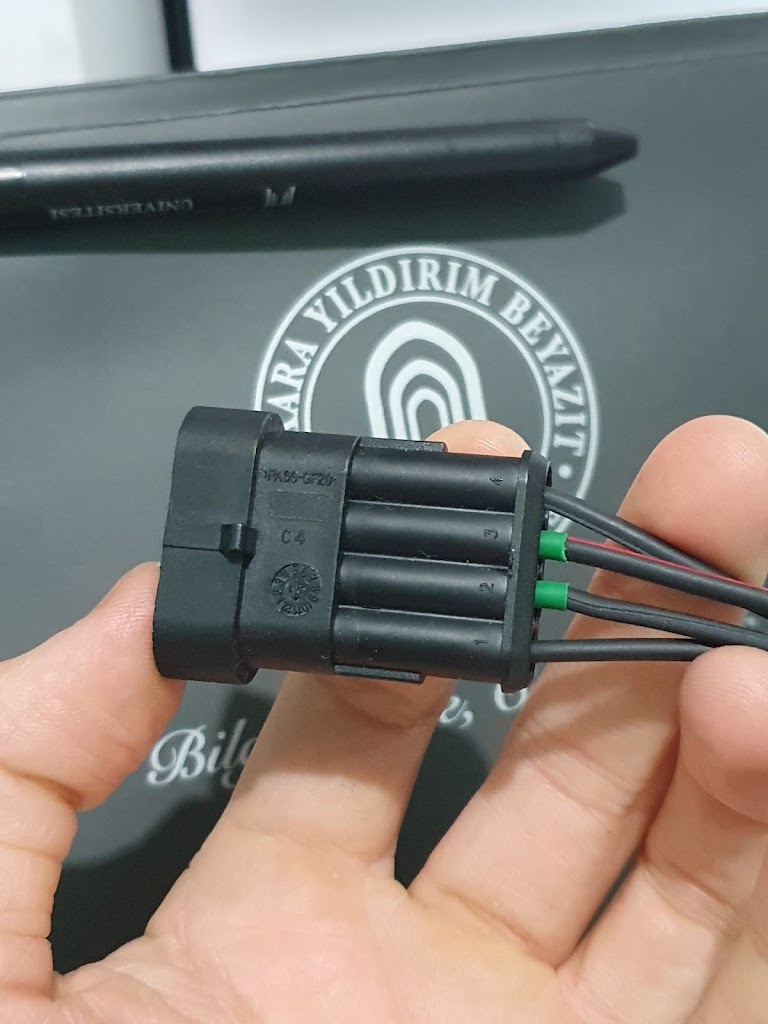
- 4 Pin Super Seal Dişi Konnektör (4 Pin Düz Su Geçirmez Konnektör)
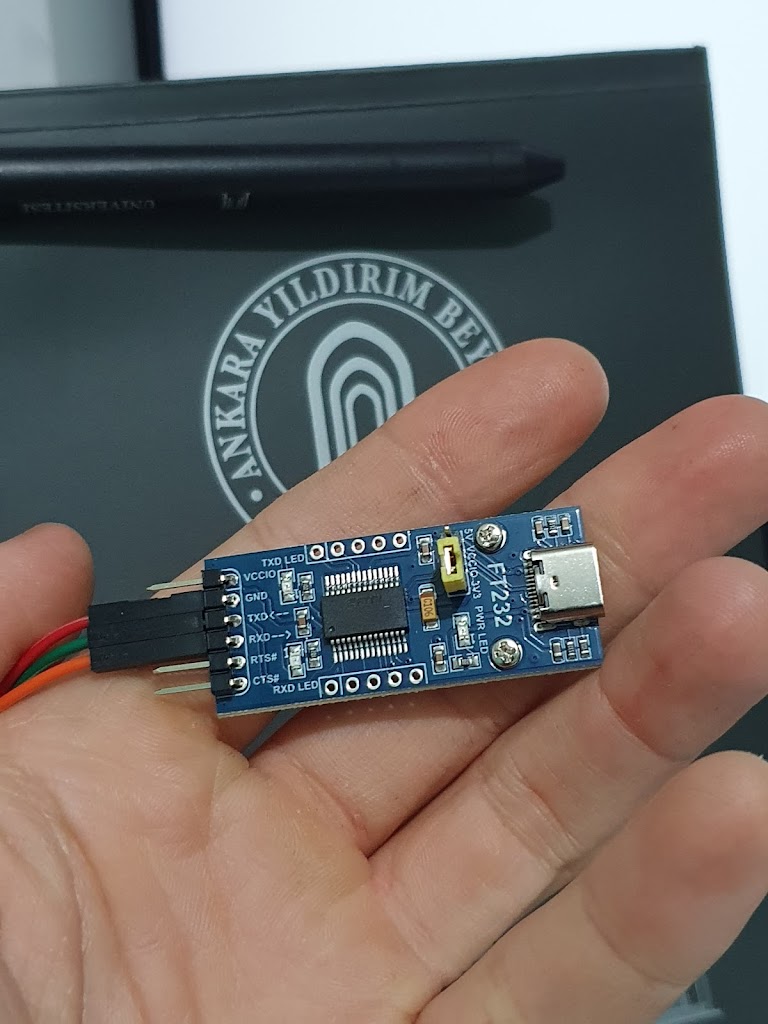
- FT232 RL USB - TTL Seri Dönüştürücü (Orijinal FTDI mikroçipli) / Dönüştürücü Kablo
- Montaj için kullanılacak kablo (Dönüştürücüyü kablo şeklinde aldıysanız çok fazla kabloya ihtiyacınız yok. Ben dönüştürücünün çıkışına (type-c) uygun olan telefon kablosunu takarak bilgisayara bağladım.)
Yapım Aşaması:
- Dişi konnektörün üstüne fotoğrafta da göründüğü gibi 1'den 4'e kadar numaralar bulunmaktadır. Bunlar sırasıyla: 1=Eksi, 2=TX, 3=RX, 4=Artı şeklindedir. Yapacağımız kablo elektrik ihtiyacını bilgisayar üzerinden karşılayacaktır. (4 numaralı pini boş bırakın ve kabloya kesinlikle bağlamayın yoksa dönüştürücü ve bilgisayarınıza zarar gelebilir.)
- USB - TTL dönüştürücü modül üzerinde belirtilen ilgili pinlere Eksi = >Eksi, TX=>RX, RX=>TX şeklinde bağlantı yapılmalıdır. Yani konnektörün 1 numaralı pini modülün eksi pinine, 2 numaralı pini modülün RX pinine, 3 numaralı pini ise modülün TX pinine bağlanacaktır.
- Bağlantıları bu şekilde yaptıktan sonra geriye kablonuzu bilgisayara takmak ve LPG kitinize uygun ayar programını açarak kullanmak kalıyor.
Dikkat Edilmesi Gerekenler:
- Malzemelerin altında verdiğim bağlantılar örnektir. Benzer sitelerden aynı özellikteki ürünleri alarak kablonuzu yapabilirsiniz.
- Piyasada yer alan eski paylaşımlarda kullanılan PL2303 USB - TTL Seri dönüştürücü güncel işletim sistemlerinde çalışmamaktadır. Siyah ya da mavi şekilde satılan bu modülü almamanızı öneriyorum. TA ve HXD modellerini denememe rağmen randıman alamadım.
- Kablonuzu bilgisayarınıza internet bağlantısı varken taktığınızda diğer ucunu araca takmanıza gerek kalmadan otomatik olarak sürücüsünü (driver) yükleyecektir. Eğer sürücü ile ilgili sorun yaşarsanız manuel olarak da yüklemeyi deneyebilirsiniz (https://ftdichip.com/drivers/). Ayrıca bu modülün bazı modellerinde haberleşme pinleri için 3.3v ve 5v seçeneğini ayarlayabileceğiniz bir switch bulunmaktadır. 3.3v seçilmesi gerekmektedir (Yukarıdaki fotoğrafta modülün üstündeki sarı kısım.). FT232 RL bütün Windows sürümlerini desteklemektedir.
Your diagnostic cable will only work with the tuning software that is specifically compatible with your LPG ECU; it will not communicate with mismatched programs. For free LPG diagnostic software packages, click here.
Required Materials:
- 4-Pin Superseal Female Connector (4-Pin Waterproof Automotive Connector)
- FT232RL USB-to-TTL Serial Converter (With genuine FTDI chip) / Converter Cable
- Wiring cable for assembly (If you purchase the converter already pre-wired as a cable, you won't need extra wire; if you buy the board module, you can connect it to your computer using a USB data cable matching the module's port, such as Type-C or Mini-USB.)
Assembly Steps:
- As shown in the photo, the female connector is numbered from 1 to 4: 1 = GND (Minus), 2 = TX, 3 = RX, 4 = +12V (Plus). Because our adapter draws its power directly from the computer's USB port, leave pin 4 disconnected—never wire it to the converter, or you risk damaging both the module and your computer.
- Wire the connector pins to the USB-to-TTL module using cross-serial pinout: GND → GND, TX → RX, and RX → TX. Specifically, connect pin 1 of the connector to GND on the module, pin 2 to RX, and pin 3 to TX.
- Once wired and insulated, simply plug the USB end into your computer, connect the 4-pin plug to your vehicle's LPG diagnostic port, and launch the software matching your LPG kit.
Important Notes:
- The store links above are provided as examples; you can source equivalent parts from any electronics supplier.
- Avoid the older PL2303 USB-to-TTL serial converters (typically sold in blue or black casings) often mentioned in outdated forum posts—they suffer from driver incompatibilities on modern Windows versions. Even after testing both TA and HXD revisions, I could not get reliable results.
- When you plug the FT232RL cable into a computer connected to the internet, Windows will automatically install the driver even before connecting to the car. If needed, you can download official VCP drivers manually from ftdichip.com/drivers. Finally, if your FT232RL module has a voltage jumper (the yellow jumper visible in the photo above), set it to 3.3V for logic communication. The FT232RL works reliably across all modern Windows releases.
Telif Bildirimi: Bu içerik ve sitedeki tüm yazılar İhsan Bal'ın fikri ve telif koruması altındadır. İzin alınmadan ve kaynak (bağlantı) belirtilmeden ticari veya gayriticari amaçla kopyalanamaz, çoğaltılamaz.
Yorumlar
Kayıt olmadan fikirlerinizi özgürce paylaşabilirsiniz.